Free
$0 forever
No card details needed
- Take payments with the keypad till
- All 8 coins on 7 networks
- Automatic payment detection
- Free customer screen
- Your last 10 sales in your history
- Zero-record mode
- 0% transaction fees from DefiPOS
Free crypto POS · Works in any browser
Type the price in your own currency. Your customer scans a QR code with their crypto wallet. The money goes straight to your wallet without DefiPOS ever holding it, and your screen confirms the payment automatically.
For cafés, shops, stalls and freelancers: keep your card machine, and get paid in crypto by customers who already hold it.
No card details. Sign up with Google or email.
How does it work?
DefiPOS turns any phone, tablet or laptop into a crypto till. If you can use a calculator, you can use this. Try a sale right here.
Corner Café
Demo
Ready
We accept


Payment detection
Solana
Simulated. Timings mirror how DefiPOS watches Solana.
Interactive demo running in your browser. Example prices, no real money.
Is it for my business?
Anywhere you'd take a payment and some of your customers already hold crypto. All you need is your phone and a signal.
Show the QR at the counter and get paid before the coffee's cold. Stablecoins suit small prices best.
Example price: £3.40 (flat white)
No card terminal to rent or charge. Your phone is the till.
Example price: €12.00 (veg box)
Get paid on the spot, in person, for haircuts, lessons and repairs.
Example price: ₹999 (guitar lesson)
Run several devices on one account. Every sale gets its own unique amount, so payments never get mixed up.
Example price: ¥1,500 (festival tee)
Do I keep my money?
Card payment providers typically charge 1.5–3% of every sale, and some add a fixed fee per transaction. DefiPOS charges nothing per sale. Your customer pays the blockchain network fee, often less than a cent on low-fee networks like Solana, Base and Polygon.
0% per saleDefiPOS never takes a cut.
No chargebacksA confirmed crypto payment can't be reversed by a third party.
Paid directlyMoney lands in your wallet, not ours.
Your estimate
You'd keep about
$420
more per year, before any exchange fee
Each month
Card machine: you keep $1,965 of $2,000 per month
DefiPOS: $2,000 of $2,000 per month reaches your wallet
On $2,000 per month of crypto sales, card fees of 1.75% would cost about $35.00 per month. DefiPOS takes 0%, so you'd keep about $420 more per year ($35.00 × 12), before any exchange fee.
Estimate for illustration only. Card fees vary by provider and plan, so check your statement for your real rate. The network fee is paid by your customer and varies by coin and how busy the network is.
Who holds the money?
Most crypto payment gateways take your customer's crypto into their own account, hold it until they pay you out, and charge a fee along the way. DefiPOS never touches it: your customer's wallet pays your wallet directly. We create the QR code and watch the blockchain for the payment. That's all.
DefiPOS
Makes the QR code and watches for the payment. Never holds funds.
Only if you choose to cash out
DefiPOS only stores your public wallet address, the one you share to get paid. We never see or store private keys or seed phrases.
Each confirmed payment links to a public block explorer, so you can check it yourself instead of taking our word for it.
Keep a history of your recent sales, or switch on zero-record mode and we won't store your transactions at all.
How do I get real cash?
You don't have to keep crypto. Send it to an exchange app such as Revolut, Coinbase or Kraken and sell it for dollars, euros, pounds or rupees. DefiPOS isn't involved in this step and takes nothing.
Payments land in the wallet address you gave DefiPOS.
Copy your crypto deposit address from your exchange app and send the crypto there from your wallet. Sending costs a small network fee, paid in that network's own coin (a little SOL, ETH, POL, BNB or TRX; on Tron a USDT transfer can cost a few dollars), so keep some in your wallet.
Tap Sell. It's now regular money in your account. Withdraw it to your bank or spend it as normal.
Exchanges set their own fees and may ask you to verify your identity. Compare before you choose.
What do I need?
There's nothing to buy, rent or install. If it opens a web page, it runs DefiPOS.
Any modern browser works. Use the phone in your pocket or an old tablet on the counter. Light and dark mode and fullscreen (on Android, tablets and computers) are built in.
Paste the receiving address from a wallet you already use. No wallet yet? The deposit address from an exchange app such as Revolut, Coinbase or Kraken works too; the money then sits with that exchange, not in your own wallet. Check it supports that coin and network, and its minimum deposit. DefiPOS checks each address is in the right format for its network before saving.
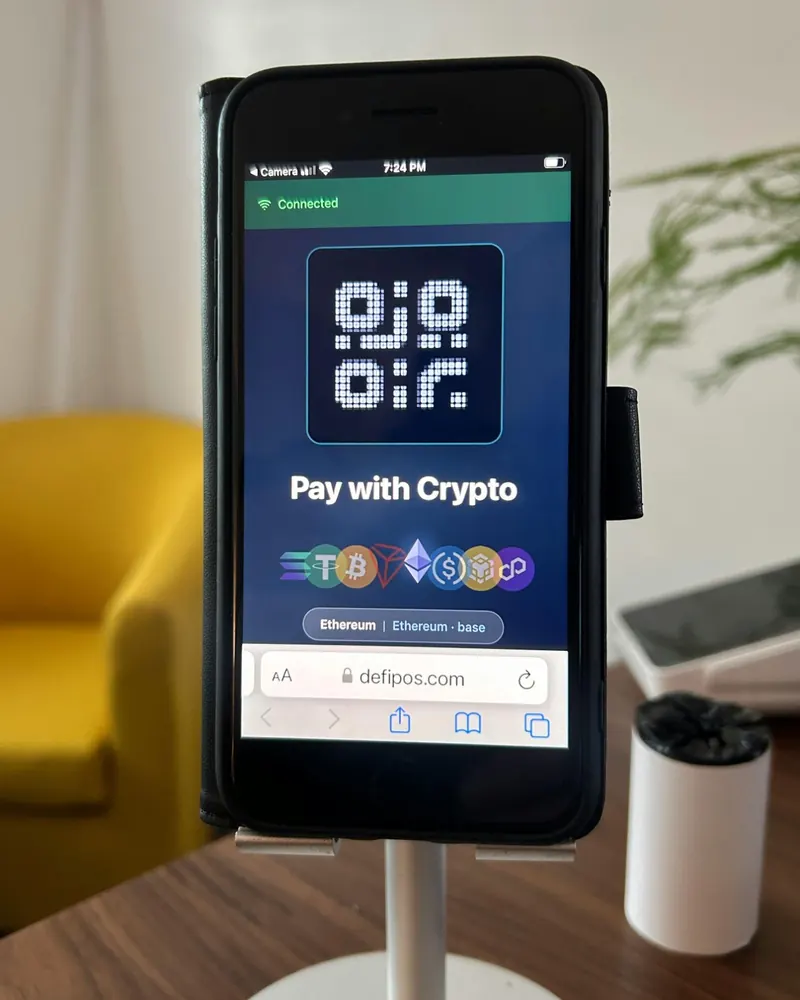
Turn a spare phone or tablet into a customer display: scan a pairing QR code and both screens stay in sync. Customers see the QR code, the amount and a clear confirmation. When it's idle, it shows your business name, the coins you accept, and your choice of a scanner frame or this LED board.
Just the crypto wallet app they already use. DefiPOS shows standard payment QR codes, including Solana Pay, that most wallets can scan. They don't need a DefiPOS account.
Works with wallets like:
 MetaMask
 Trust Wallet
 TronLink
What can customers pay with?
Eight popular coins across seven networks, all included on the free plan. Switch on the ones you want.
| Coin | Bitcoin | Ethereum | Base | Solana | Tron | BNB Smart Chain | Polygon |
|---|---|---|---|---|---|---|---|
| BitcoinBTC | Supported | Not available | Not available | Not available | Not available | Not available | Not available |
| EthereumETH | Not available | Supported | Supported | Not available | Not available | Not available | Not available |
| SolanaSOL | Not available | Not available | Not available | Supported | Not available | Not available | Not available |
| TetherUSDT | Not available | Supported | Supported | Supported | Supported | Supported | Supported |
| USD CoinUSDC | Not available | Supported | Supported | Supported | Not available | Not available | Supported |
| TRONTRX | Not available | Not available | Not available | Not available | Supported | Not available | Not available |
| BNBBNB | Not available | Not available | Not available | Not available | Not available | Supported | Not available |
| PolygonPOL | Not available | Not available | Not available | Not available | Not available | Not available | Supported |
Small sales? Stablecoins on Solana, Base, Polygon or BNB Smart Chain keep your customer's network fee to cents.
What does it cost?
Start on the free plan. It includes every coin we support. Premium adds tools for busier shops and is coming soon.
$0 forever
No card details needed
Coming soon
Planned price: $9.99 per month.
For shops that need a proper till
Not available to buy yet.
Need these features? Tell usEverything in Free, plus:
Prices in USD. The planned Premium price may change before launch. Your customer pays the blockchain network fee on each payment.
Still wondering?
DefiPOS is a free crypto point of sale that runs in your web browser. You type a price in your own currency, your customer scans a QR code with their crypto wallet, and the payment goes straight to your own wallet. DefiPOS detects the payment on the blockchain automatically and never holds your money.
No. They need a crypto wallet that holds the coin they're paying with. DefiPOS shows standard payment QR codes that most wallets can scan, such as MetaMask, Trust Wallet, Coinbase Wallet, Phantom, Solflare and TronLink. Your customers don't need a DefiPOS account.
Yes. You can paste the receiving (deposit) address from an exchange app such as Revolut, Coinbase or Kraken, so payments land ready to sell. The money then sits with that exchange rather than in a wallet you control. Check the exchange supports that coin and network, and its minimum deposit: some exchanges don't credit payments below a minimum.
No. Every payment goes directly from your customer's wallet to the wallet address you set. DefiPOS creates the QR code and watches the blockchain to confirm the payment. We never have access to your funds or your private keys.
The free plan has no monthly fee, and DefiPOS takes 0% of your sales. Its limits: the app shows your last 10 sales, and the product-menu till, multiple locations, full history and CSV export are Premium features (planned at $9.99 a month, coming soon). Your customer pays the blockchain network fee: often less than a cent on Solana, Base and Polygon, but higher on Bitcoin, Ethereum and Tron (sending USDT on Tron often costs a few dollars' worth of TRX).
DefiPOS is run by Crypto Enthusiasts based in Essex, England. The free plan charges you nothing because DefiPOS never processes or holds your money. It only creates the QR code and watches the blockchain for the payment. Premium, a paid plan with extra tools for busier shops, is planned.
Bitcoin (BTC), Ethereum (ETH), Solana (SOL), Tether (USDT), USD Coin (USDC), TRON (TRX), BNB and Polygon (POL), on the Bitcoin, Ethereum, Base, Solana, Tron, BNB Smart Chain and Polygon networks. USDT works on six networks and USDC on four. Every coin is included on the free plan.
It depends on the coin. Solana usually confirms in about a second. Payments on Base, Polygon and BNB Smart Chain are detected when they're included in a block, usually within a few seconds, and on Ethereum about every 12 seconds. Tron is checked every six seconds. Bitcoin payments are spotted as soon as they're broadcast, then confirmed in a block about 10 minutes later on average. DefiPOS marks a Bitcoin sale as paid as soon as it's broadcast. Until the first block confirms it, it can still be replaced, so for larger sales wait for the confirmation in your wallet. DefiPOS watches for 5 minutes after you show the QR code, so keep the till open while your customer pays.
Each payment gets unique final digits (for example 4.500347 USDC instead of 4.50), so DefiPOS can match the payment to the right sale, even when two identical sales happen at once on different devices. On stablecoins the difference is less than a tenth of a cent. On Bitcoin the last digits can move the amount by up to 99 satoshis (0.00000099 BTC) either way, which is why stablecoins suit very small sales.
DefiPOS matches payments by the exact amount, so customers should pay what the QR code shows without editing it. Paying from an exchange that deducts a withdrawal fee can cause a mismatch too. A different amount still arrives in your wallet but won't be marked as paid automatically, so check your wallet or the block explorer. Crypto payments can't be charged back; to refund, send the money back from your wallet.
Send it from your wallet to an exchange such as Revolut, Coinbase or Kraken and sell it for your local currency. You can even use your exchange's deposit address as your DefiPOS wallet address so payments land there directly. DefiPOS isn't involved and takes nothing; exchanges set their own fees and may ask you to verify your identity. Check the exchange supports that coin and network, and its minimum deposit: some exchanges don't credit payments below a minimum, and small sales can fall under it.
Switch on only USDC or USDT and the till will only offer those. They're designed to track the US dollar, so a sale's value stays close to its dollar price. Coins like Bitcoin move with the market until you sell, and you can sell whenever you like.
Each sale is saved with its value in your currency. The free plan shows your 10 most recent sales; full history and CSV export are planned for Premium. Every payment is also in your wallet's on-chain history. In zero-record mode DefiPOS stores nothing, so keep your own records. Tax rules differ by country, so ask your accountant.
Not with DefiPOS. You sign up with Google, or with email and a password confirmed by a 6-digit code. No ID documents. Exchanges you use to cash out may have their own verification rules.
It's a simulation running in your browser, using example prices, so no real money moves. The till, the unique amount and the step-by-step confirmation work the same way as the real DefiPOS, and the QR code it shows simply opens defipos.com.
How fast can I start?
Setup is three short steps. Most of the time goes on copying your wallet address.
Google, or email and a password.
Paste one for each coin you want to accept. No wallet yet? An exchange app's deposit address works too (see the FAQ). Want steady prices? Add only USDC or USDT.
Open the till, type a price, show the QR code.
Free plan · 0% fees from DefiPOS · No card details
Got a question first? Contact us